Emoji Keyboard: Custom Themes
- 4.0
- Rating
- 100.00K
- Installs
- Free
- Price
 Analysis by App-foxy
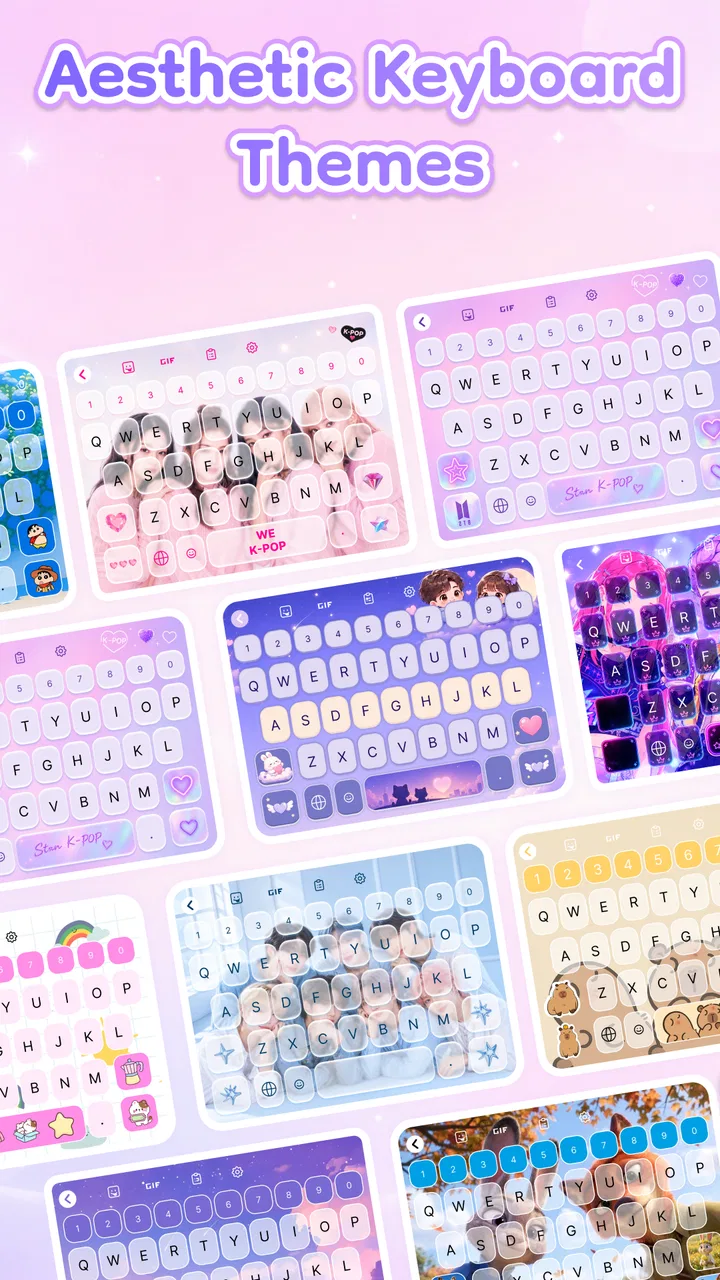
I installed Emoji Keyboard: Custom Themes because I wanted a more personal typing experience without replacing my phone’s entire visual style. It is a free personalization app from Funny Plays, built around changing the keyboard with decorative themes, fonts, sounds, and emojis. That sounds simple, but a keyboard sits in the middle of almost everything I do on a phone, so small choices about appearance and input can affect messaging, searching, posting, and even filling out forms.
My first impression was that this is best understood as a visual customization tool rather than a complete replacement for every keyboard habit. The app’s short store description calls it an Emoji Keyboard, while its broader summary points toward themes, fonts, sounds, and emoji options. In practice, that combination makes it appealing to people who find a standard keyboard too plain and want their messages to feel more expressive before they even add a sticker or emoji.
The app belongs to the Personalization category, and its Everyone age rating makes the intended audience broad. It was released on January 18, 2026, and the current version is 1.0.2. Those details matter mainly because this is a relatively new app, so I approached it as a focused customization experience rather than a mature keyboard ecosystem with years of accumulated tools and settings.
You May Also Like

 Blood Strike: 2.5 Anniversary
Blood Strike’s Loadouts Turn Every Drop Into a Tactical Gamble
A close look at Blood Strike’s custom loadouts: how fast access to signature weapons reshapes its battle royale rhythm, rewards preparation, and narrows the gap between fights.

 Pandora - Music & Podcasts
Pandora’s Music Is Easy to Start, but Harder to Recover
Pandora’s strength is its low-effort path from a seed to a station. Its weak spot is how much confidence it asks you to place in connection, setup, and quiet recovery.

 8 Ball Pool
 Is Built on Rivalries, Rematches, and Routine
A close look at the rivalries, rematches, shared routines, and unanswered safety questions that turn a quick pool match into a persistent mobile community.

 Samsung Music
’s Quiet Strength Is Playing What You Already Own
Its reach comes less from spectacle than from dependable access to a personal library. That simplicity is both the app’s strongest retention engine and its ceiling.

 AccuWeather: Weather Radar
AccuWeather Review: A Quick, Clear Forecast for Everyday Decisions
For everyday plans, the best forecast is the one you can understand quickly. AccuWeather makes rain timing, radar, and local conditions easy to act on, with a few trade-offs.

 Hill Climb Racing
Why Hill Climb Racing Still Turns Crashes Into One More Run
A tiny car, a bumpy hill and one more upgrade: Hill Climb Racing keeps resurfacing because its simple chaos makes every near-miss feel personal.
More From Our News Desk



From a plain keyboard to a more personal typing workflow
I look at the keyboard as part of the whole typing routine, not just a place to pick a new color or font. A setup that feels inviting in a chat still has to stay readable when I’m searching or entering details, so I’d start with a style I can use comfortably across different tasks. That practical baseline makes it easier to judge how the app holds up when typing gets busy.
Starting with the reason to install it
The most realistic reason to try this app is not that typing suddenly becomes faster. It is that the keyboard is one of the most frequently seen parts of a phone, and a different background, type style, sound, or emoji arrangement can make routine conversations feel less repetitive. I can see the appeal for someone who spends a lot of time in group chats, posts casual updates, or enjoys matching their phone’s look to a favorite color or mood.
I would not install it expecting a replacement for a highly specialized productivity keyboard. If my priority were advanced text correction, multilingual writing, voice input, or a carefully tuned professional workflow, I would first look at a long-established general-purpose keyboard. This app’s strongest reason to exist is the personality it adds to the input area, not a promise that every typing problem will disappear.
The free price removes the biggest barrier to experimenting. I can try a visual style, decide whether it fits my daily use, and move on without treating the installation as a major purchase. That is especially useful for people who change themes often or want a playful keyboard for a secondary device. The trade-off is that a free customization app needs to earn its place through convenience; if switching styles becomes annoying, the novelty will not be enough.
Setting up the look before judging the experience
The first useful step is to choose a theme that remains readable in ordinary conditions, not just one that looks attractive in a preview. A busy background can make key boundaries harder to see, while an overly decorative font may be fun for a screenshot but tiring during a long conversation. I found it helpful to think about contrast and key visibility before choosing the most colorful option.
Fonts are another area where restraint pays off. A distinctive type style can make the keyboard feel more personal, but the best choice is one that lets me identify letters quickly. I would use a more expressive style for casual messaging and keep a clearer option available for searches, addresses, or longer notes. That small separation between “looks fun” and “works for ten minutes of typing” is easy to overlook.
Sounds need the same practical judgment. A key sound can make typing feel more responsive, especially when the visual theme is subtle. In a quiet room, on public transport, or during a meeting, however, extra audio can become irritating. My preferred workflow is to treat sound as an occasional style choice rather than a permanent setting. The feature is more useful when it can support a mood without taking over every tap.
Building a message from input to outcome
Imagine a normal evening: a friend sends a message asking whether I am joining dinner, and I want to answer quickly but with a little more personality than a plain sentence. I open the chat, use the customized keyboard to type the reply, and then add an emoji that matches the tone. The keyboard handles the first stage of that process, while the emoji selection helps with the handoff from words to expression.
This is where the app feels most natural. I am not stopping to create a graphic or edit a picture; I am making a small adjustment inside a familiar conversation. A theme gives the keyboard identity, the font changes the feel of the letters, and emojis provide the emotional shortcut that text alone sometimes lacks. The result is modest, but it fits the way people actually communicate on a phone.
A useful habit is to pick the theme before starting a conversation rather than changing it halfway through a serious message. Switching styles while composing can interrupt the flow and make the keyboard feel like a separate task. For everyday use, I would choose one comfortable default and reserve more dramatic themes for casual chats, social posts, or moments when visual variety matters more than speed.
Managing the handoff between keyboard and other apps
A keyboard is not used in isolation. It hands typed content to messaging apps, social networks, browsers, shopping forms, email clients, and search boxes. That handoff is the real test. A theme that looks excellent in a chat still needs to remain comfortable when I am entering a search query or writing something longer.
For short messages, the visual changes are easy to appreciate. For longer text, I pay more attention to whether the chosen font slows recognition and whether the sound becomes distracting. I would also keep an eye on how the keyboard feels when moving between informal and practical tasks. A single decorative setup may be perfect for chatting but less suitable for entering a delivery address or completing a form where accuracy matters more than appearance.
Emoji use has a similar handoff issue. Emojis can clarify tone, but too many can make a message harder to read. I get better results when I use the keyboard’s expressive options as punctuation rather than decoration on every line. That makes the feature feel intentional and keeps the conversation understandable for people who do not share my taste in symbols.
Another practical question is whether the people receiving my messages need the app installed. They do not need to use the same keyboard simply to see the text and emojis I send. The customization happens on my device, while the finished message travels through the app I am already using. That makes the app easier to introduce into a group conversation because it does not require friends or family to change their own setup.
Where it fits beside the usual keyboard choices
The usual phone keyboard is generally the safer choice when I want a familiar layout, predictable correction, and minimal setup. A major general-purpose keyboard may also be better for people who switch languages regularly, dictate messages, or rely on advanced writing assistance. Those tools are designed around broad input needs, whereas this app is centered on making the keyboard look and sound different.
Compared with a dedicated theme-only tool, Emoji Keyboard: Custom Themes has a wider creative focus because it brings together visual style, font choices, sounds, and emojis. That combination is convenient for someone who wants one place to shape the mood of the keyboard instead of collecting separate customization tools. The compromise is that a broader set of decorative options does not automatically mean deeper control over every technical aspect of typing.
I would choose this app over the default keyboard when appearance is part of the reason I enjoy using my phone. I would choose the default or a mature productivity keyboard when I am writing a long document, working in several languages, or depending on highly refined correction. The decision is not really about which keyboard is universally best; it is about whether visual expression or input efficiency comes first in my daily routine.
Three practical ways to get more from the customization
Keep a readability-first setup for practical tasks. Use a clear font and a calm theme when searching, filling forms, or writing longer messages, then switch to a more expressive style for casual conversations. This avoids forcing one decorative choice onto every situation.
Use sound as feedback, not background noise. A keyboard sound can make taps feel more noticeable, but it is better treated as a situational option. Turning it down or off before entering a quiet environment prevents the customization from becoming a social nuisance.
Pair emojis with the purpose of the message. One well-chosen emoji can soften a short reply or make a joke clearer. Creating a small personal habit around when to use them keeps the result expressive without making every message visually crowded.
These workflows also reveal an important trade-off: customization is most valuable when it stays out of the way. If I have to repeatedly adjust the keyboard before every task, the app becomes less convenient than the standard option. The best result comes from preparing a comfortable everyday style and changing it only when I genuinely want a different atmosphere.
What the current release suggests about expectations
The app has an average rating of 4.3 from around a hundred ratings, with seven written reviews, and it has passed ten thousand installs. Those figures suggest that people are trying it and generally responding positively, while the smaller review volume means I would not treat the rating as a complete picture of every phone model or typing habit.
The version I reviewed is 1.0.2, so I would keep expectations realistic about polish. A new personalization app can be enjoyable while still feeling less established than the keyboard that came with the phone. Small details matter here: how quickly a theme can be changed, how comfortable the layout remains after customization, and whether the visual choices continue to feel useful after the first few days.
Because the app is free and rated for Everyone, it is easy to recommend as a low-risk experiment for families, casual users, and anyone who enjoys changing the appearance of a device. I would still encourage a gradual approach: start with a readable theme, test it in a private message, then use it in more demanding situations. That gives me a better sense of whether the style is genuinely comfortable or merely attractive at first glance.
Where the workflow breaks down
The main friction appears when the decorative layer competes with typing. A flashy theme can reduce visual clarity, an unusual font can slow letter recognition, and repeated sounds can become tiring. None of those issues cancels the app’s purpose, but they make it clear that the most eye-catching setup is not necessarily the most usable one.
I would also skip it if I want a keyboard primarily for professional writing or advanced input control. Someone who depends on a highly predictable correction system, frequent language switching, or specialized accessibility adjustments may be better served by a keyboard designed around those needs first. This app makes more sense when the keyboard is part of a phone’s style rather than simply a tool for entering text.
Another breaking point is impatience with setup. If I want to install something and never think about keyboard appearance again, the default option is probably more suitable. Customization always introduces choices, and choices can become friction when I am in a hurry. The app rewards users who enjoy trying styles, not users who regard visual settings as unnecessary maintenance.
My result after using it in everyday situations
After working through the full path from choosing a theme to sending a finished message, I see Emoji Keyboard: Custom Themes as a pleasant personalization layer with a clear audience. It makes the keyboard feel less anonymous and brings several expressive controls into the same experience. The strongest result comes in casual conversations, where a visual theme, a comfortable font, and a well-timed emoji can make a routine exchange feel more like my own.
I would recommend it to a friend who wants a free way to refresh the look of their phone and does not need a keyboard built primarily for serious writing. I would suggest starting with readability, testing the sound in real surroundings, and keeping one practical style for forms and longer text. Those small decisions make the difference between a keyboard that is genuinely enjoyable and one that becomes tiring after the novelty fades.
Funny Plays has made a focused app rather than an all-purpose productivity solution, and that focus is its advantage. It does not need to replace every keyboard on every device to be worthwhile. If your ideal typing experience includes color, personality, sounds, and easy access to emojis, this free app is worth trying. If your priority is maximum speed, advanced writing support, or a completely invisible keyboard, the familiar alternative will likely serve you better.
My final view is positive but measured: the best reason to use Emoji Keyboard: Custom Themes is the small daily lift it gives to ordinary conversations. It is most successful when customization supports the message instead of distracting from it. Used that way, it turns an overlooked part of the phone into something more personal without demanding that every task become a visual performance.
FAQs for Emoji Keyboard: Custom Themes
01What customization options does Emoji Keyboard: Custom Themes offer?
Emoji Keyboard: Custom Themes provides a wide range of customization options, allowing users to personalize their typing experience. You can change the keyboard's background, choose from a variety of themes, and even create your own custom themes using personal images or colors. This level of customization ensures your keyboard reflects your unique style.
02Is Emoji Keyboard: Custom Themes compatible with all messaging apps?
Yes, Emoji Keyboard: Custom Themes is designed to work seamlessly across a variety of messaging and social media apps. Whether you're using WhatsApp, Facebook Messenger, Instagram, or any other popular platform, you can easily access the keyboard and enjoy its features without compatibility issues.
03Does the app include a wide variety of emojis and stickers?
Absolutely! Emoji Keyboard: Custom Themes boasts a vast collection of emojis and stickers, providing users with an extensive selection to express themselves creatively. The app frequently updates its library to include the latest emojis and trending stickers, ensuring you always have fresh content to choose from.
04How does Emoji Keyboard: Custom Themes handle user privacy and data security?
The app prioritizes user privacy and data security, adopting stringent measures to protect your personal information. It does not collect any sensitive data without user consent. Additionally, the app regularly updates its security protocols to safeguard against potential threats, ensuring a secure user experience.
05Is Emoji Keyboard: Custom Themes user-friendly for beginners?
Yes, Emoji Keyboard: Custom Themes is designed with user-friendliness in mind, making it accessible even for beginners. The interface is intuitive, with easy-to-navigate settings and straightforward customization options. Users can quickly set up and personalize their keyboards without any technical expertise, enhancing their overall experience.
Pros
- Wide variety of emojis available.
- Easy customization of keyboard themes.
- User-friendly interface design.
- Supports multiple languages.
- Frequent updates with new features.
Cons
- Occasional ads can interrupt usage.
- Some themes require in-app purchases.
- May consume more battery power.
- Limited free theme options available.
- Requires internet for theme updates.

Emoji Keyboard: Custom Themes
Gallery